Every call answered, the hard ones handed to a person
A working prototype of an intake desk for a nine-lawyer personal injury and family law firm. An automated agent takes calls, web forms and chats at any hour, asks the firm's own qualification script, runs a conflict check and books the consultation. What reaches the intake coordinator is only what the agent is not allowed to settle.
Runs in your browser on sample data. Nothing you do in it is stored. Built for personal injury and family law firms.
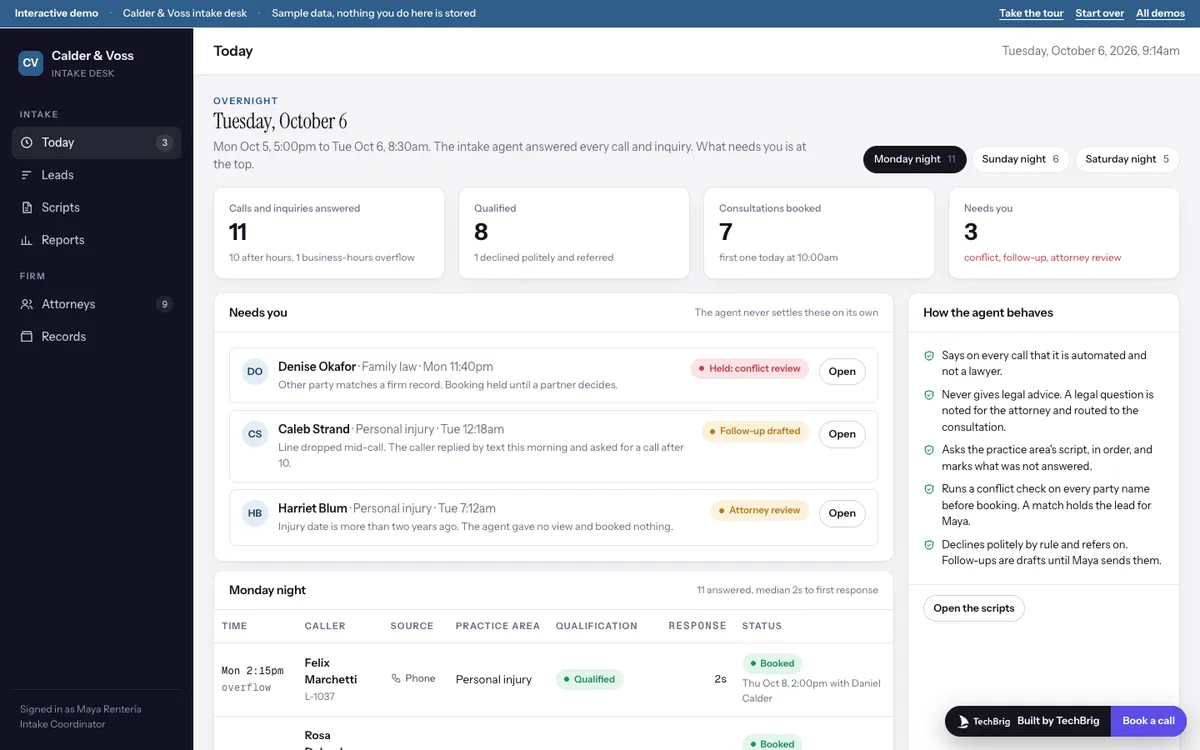
Calder & Voss LLP, Tuesday October 6 at 9am: eleven calls and inquiries answered since Monday afternoon, seven consultations booked, three waiting on Maya.
Six things the demo does end to end
The overnight summary
Calls and inquiries answered, how many qualified, how many consultations were booked, and the short list of what needs a person: a conflict review, a dropped call, an injury date that needs an attorney's eye.
A transcript that builds its own file
Press Play on any call and the turns replay with timestamps. The facts panel fills in as the caller speaks, and each fact carries the moment in the call it came from.
Qualification against the firm's script
Each question in the practice area's script is marked answered or not. The verdict says why: qualified, incomplete with a follow-up drafted, declined by rule, or held for an attorney.
A conflict check that blocks the booking
Every party name is checked against the firm's records before a slot is offered. One caller's spouse is a former client; the agent says the coordinator will call and books nothing.
Follow-ups as drafts
A caller who hung up from the ER got one text overnight by rule. The reply he sent at 6:50am sits beside a drafted text and email for Maya to edit and send.
Scripts the firm can change
Questions, required flags, decline rules and hand-to-a-person rules are edited in place. A change applies to the qualification check on every call, old and new.
Three steps, five minutes
Take the tour
Fifteen stops in about five minutes: the overnight summary, one call end to end, the conflict flag, the follow-up draft, the pipeline, the scripts and the weekly report.
Open Denise Okafor
Watch the conflict check find the match, then clear it and pick a slot, or decline and refer. Either choice persists until you start over.
Edit a script and go back
Add a question to the personal injury script, then open any call. The new question shows as not answered until the agent asks it.
We build it custom for your firm
The demo runs on sample data. A real build connects to your own tools and is fitted to how you already work.
Your phone line, your forms and your chat
Connected to the firm's existing number through the telephony provider you already use, to the website forms, and to live chat, with the same agent and the same script behind each.
Your script and your decline rules
The questions each practice area needs, the rules for declining politely and referring on, and the cases that always go to a person, written with the attorneys who review intake today.
Your records and your calendar
The conflict check reads the firm's matter and party records; bookings go onto the attorneys' real calendars with their own availability rules and confirmation texts.
A person owns every outcome
The agent books the clear cases and drafts the rest. The intake coordinator sends every follow-up, and a partner clears every conflict. Nothing is promised to a caller that the firm has not approved.
Want this built for your firm?
Thirty minutes with Ishaan: what it would connect to, what it needs from your side, and whether it makes sense to build it together.
Book a free callor write to us at [email protected]