Field notes in, a customer-ready quote out
A working prototype of a quoting system for restoration and trades contractors. A technician dictates what they see and takes photos; the system reads rooms, dimensions and damage out of the note, applies the company's price book and rules, flags what is missing, and hands the estimator a quote to edit and send.
Runs in your browser on sample data. Nothing you do in it is stored. Built for restoration and trades contractors.
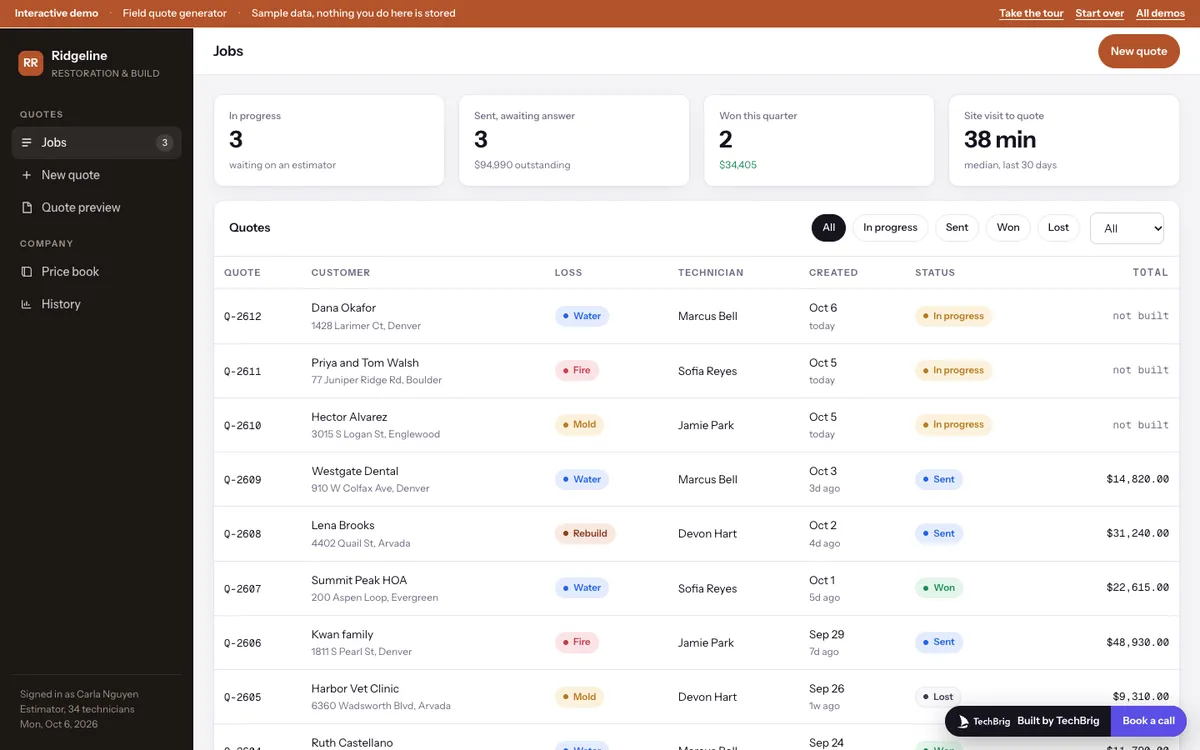
Ridgeline Restoration & Build, 6 October 2026: three jobs waiting on an estimator, each with a dictated note from the technician on site.
Six things the demo does end to end
A note that parses
Room names, dimensions in whatever form the technician said them, ceiling height, floor type, wick height, affected percent, which walls, exterior walls, ceilings, soot and mold. Each field carries a confidence and the words it came from.
Gaps flagged, questions drafted
A room with no dimension or a wall with no wick height is marked in red, and the question for the technician is already written in plain language. Nothing is quietly assumed.
Line items with their rule
Air movers per square foot, flood cut height from the wick line, antimicrobial on every wet surface. Every line says which rule produced it, grouped by room and phase, with quantity and rate open to edit.
A total that moves
Change a quantity or a rate and the subtotal, overhead, profit, tax and margin update as you type. Remove a line you disagree with; rebuild from the rules when you want it back.
The customer document
Letterhead, a scope narrative drafted from the parsed note with a source chip on every sentence, the line items, terms and a cover email. The estimator edits the narrative before anything goes out.
The price book is the product
Rates, rules and regional multipliers sit in one place the company owns. Change the air mover rule and the next build uses it. History shows win rate by loss type and how long a quote takes.
Three steps, five minutes
Take the tour
Fifteen stops, about five minutes, from the jobs list through parsing, building, editing and the customer preview.
Edit the note
On New quote, change a dimension or add a room, press Parse notes, and watch the structure and the questions change. Then Build quote.
Change a rule
Open Price book, set air movers to one per 100 square feet, go back and rebuild. The drying lines and the total follow.
We build it custom for your company
The demo runs on sample data. A real build connects to your own tools and is fitted to how you already work.
Your price book and your rules
Your rates, your drying and demolition rules, your overhead and profit, loaded from the spreadsheet or Xactimate export you already use, and editable by your office without a developer.
Notes and photos from the field
Technicians dictate into the phone they already carry. Photos are read for meter readings, water lines and materials, and each one supports the field it came from.
Tested on your last quarter
Run on quotes you already sent, compared line by line with what your estimator produced, and tuned until the gap is small before it touches a live customer.
The estimator sends every quote
The system drafts, prices and flags. A person reviews, edits and sends. Every number carries the note, photo or rule it came from.
Want this built for your company?
Thirty minutes with Ishaan: what it would connect to, what it needs from your side, and whether it makes sense to build it together.
Book a free callor write to us at [email protected]