Tenant messages in, work orders and a briefing out
A working prototype of an operations center for an owner-operator with 14 buildings and 412 units. Messages arrive on every channel, get categorized and matched to a vendor, and the manager sees only what needs a decision. The owner sees every building and gets a monthly report drafted from the records.
Runs in your browser on sample data. Nothing you do in it is stored. Built for owner-operators of residential buildings.
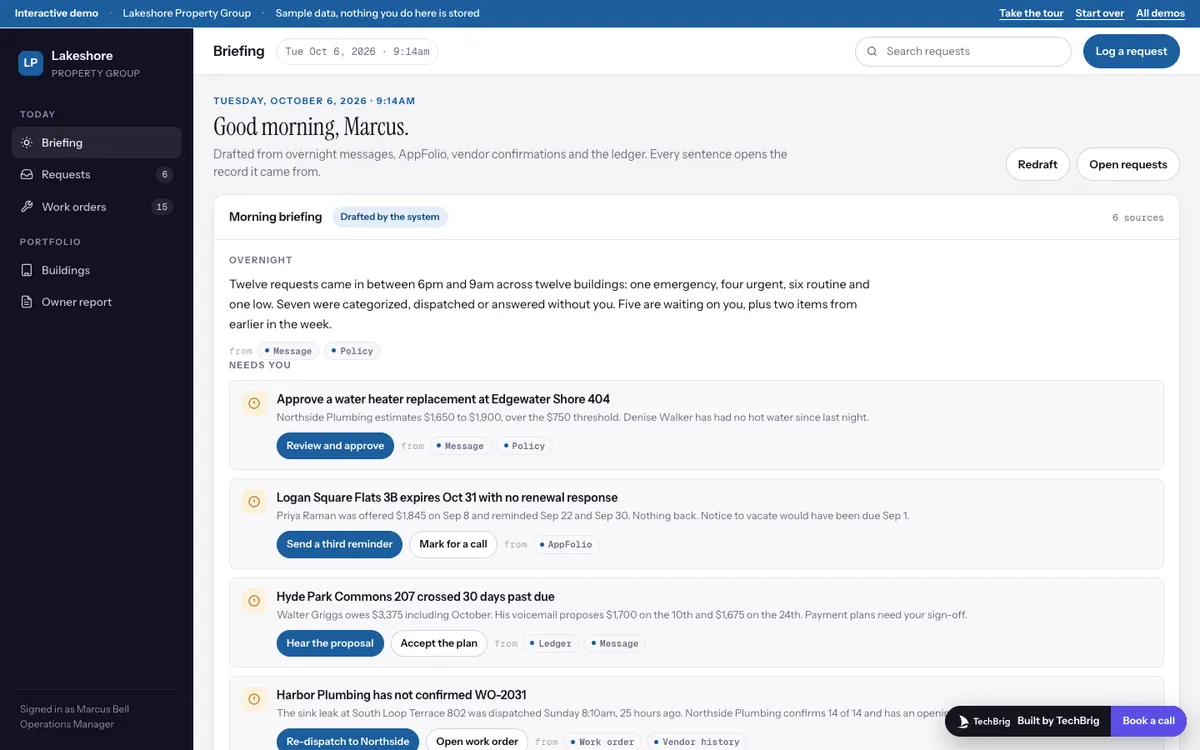
Lakeshore Property Group, Tuesday October 6: twelve requests overnight, seven handled, five waiting on Marcus, plus a lease, a delinquency and a vendor who did not confirm.
Six things the demo does end to end
The morning briefing
Drafted from overnight messages, AppFolio, vendor confirmations and the ledger: what needs the manager, requests by urgency, rent collected against due, leasing, and the list of what was handled without him.
Requests categorized on arrival
Each text, email, portal message or voicemail transcript gets a category, an urgency with the reason, the details the system read, a proposed vendor with past jobs at that building, and a cost estimate.
A drafted work order and a drafted reply
The scope, the window and the message back to the tenant are written for the manager to edit and send. Over the cost threshold, the work order waits for approval.
Work orders with a timeline
A board by status with vendor, window and tenant confirmation. Each order shows every step from the first message to the tenant's rating, and a vendor who did not confirm gets a re-dispatch suggestion.
The owner view
Fourteen buildings with occupancy, collected against due, delinquencies, open orders, upcoming expirations and a twelve-month sparkline, with a drill-in to every unit.
The monthly report
September written paragraph by paragraph from the data, each one carrying the records it came from, editable, and sent to the owner with a click.
Three steps, five minutes
Take the tour
Fourteen stops, about five minutes. It walks from the briefing into one overnight request, its vendor and work order, an approval, the work order board, the buildings and the owner report.
Open a request that needs you
Tomás Herrera's outlet or Denise Walker's water heater. Read what the system extracted, open a source chip, edit the reply, create the work order or approve it.
Drill into a building
Hyde Park Commons has four delinquencies and an overnight leak. Filter the units, open the open work orders, then read the September report and send it.
We build it custom for your portfolio
The demo runs on sample data. A real build connects to your own tools and is fitted to how you already work.
Your property software and your channels
Connected to AppFolio, Buildium, Yardi or Rent Manager, and to the phone line, inbox and portal tenants already use, so requests arrive where they are sent today.
Your vendors and your rules
Your vendor list with rates and history, your approval threshold, your urgency rules and quiet hours, so the system proposes what your team would have done.
Tested on last month
Run on a month of your real messages and work orders, compared with what the team actually did, and tuned until the categories and vendor picks match before it goes live.
A person sends and approves
The system drafts, categorizes and proposes. A manager approves anything over the threshold, sends every reply, and the owner report goes out only when someone clicks send.
Want this built for your portfolio?
Thirty minutes with Ishaan: what it would connect to, what it needs from your side, and whether it makes sense to build it together.
Book a free callor write to us at [email protected]