Answers from your own documents, with the passage behind every sentence
A working prototype of a knowledge assistant for a professional services firm. It answers questions over the compliance manual, SOPs, fee schedule, investment policy, HR handbook, precedent letters and continuity plan, and it will not write a sentence it cannot point to.
Runs in your browser on sample data. Nothing you do in it is stored. Built for advisory, accounting and law firms.
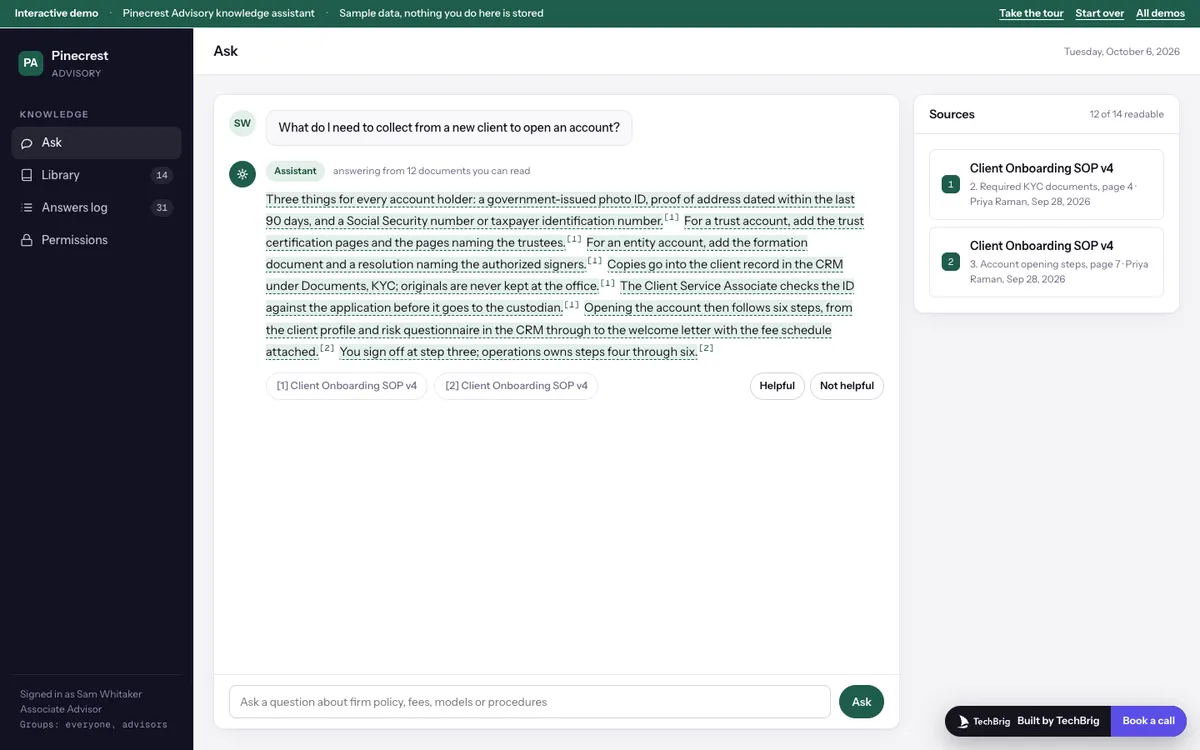
Pinecrest Advisory, October 2026: Sam Whitaker asks what to collect from a new client, and each sentence of the answer links to the onboarding SOP.
Six things the demo does end to end
Answers typed from the documents
Ask about gifts, pre-clearance, KYC, fees, rebalancing bands, parental leave or the continuity plan. The assistant searches, reads the matching passages and writes the answer sentence by sentence, each one marked with its source.
The passage, not just the title
Click any cited sentence and the section it came from opens beside the chat, with the exact line highlighted. Document, section, page, owner and last update sit above it.
Two documents that disagree
The 2026 manual says $100 for gifts; a 2025 reference card still says $75. The assistant shows both passages, says which is newer, and tells you who to confirm with.
When the documents are silent
Ask about cryptocurrency in client accounts and it says the documents do not cover it, shows the closest passage it checked, and offers to send the question to the person who owns that policy.
Access by folder
Each folder carries one access group. Move the fee schedule to Partners and the same fee question is refused for an associate advisor, with nothing from the document leaking into a summary.
An answers log for Compliance
Every question, who asked, when, what was cited, and which answers were marked unhelpful. It shows where people are confused and which documents need an update.
Three steps, five minutes
Take the tour
Fifteen stops. It asks three questions, opens a cited passage, shows the disagreement and the do-not-know cases, then walks the library, the log and permissions.
Ask something of your own
Type a question in plain words. It matches the closest covered topic, or says the documents do not cover it and names who to ask.
Restrict a folder
Under Permissions, set Fees and billing to Partners and ask the fee question again. Then open the answers log to see the refused question recorded.
We build it custom for your firm
The demo runs on sample data. A real build connects to your own tools and is fitted to how you already work.
Your documents, where they already live
Connected to SharePoint, Google Drive, Box, a document management system or a shared drive, with re-indexing when a file changes and the old version retired.
Your groups and your folders
Access read from your directory, so an answer is only ever built from documents the person asking could open themselves. Nothing is summarized across a permission boundary.
Citations a reviewer can check
Every sentence carries the document, section and page it came from, and the passage opens in one click. Answers that cannot be grounded are refused rather than guessed.
A log Compliance can act on
Who asked what, what was cited, and what was marked unhelpful or left unanswered, so the gaps in the documents are visible and get fixed.
Want this built for your firm?
Thirty minutes with Ishaan: what it would connect to, what it needs from your side, and whether it makes sense to build it together.
Book a free callor write to us at [email protected]