Every drop, every file, and what the client said about it
A working prototype of a client portal for a creative agency. Campaigns are broken into dated drops, each drop has a concept board, each concept holds the creative, and the finished work lands on an ads sheet. The client sees only what the studio has shared. The system drafts the weekly update, the designer's change list and three concept directions, and a person edits and sends.
Runs in your browser on sample data. Nothing you do in it is stored. Built for creative studios and their clients.
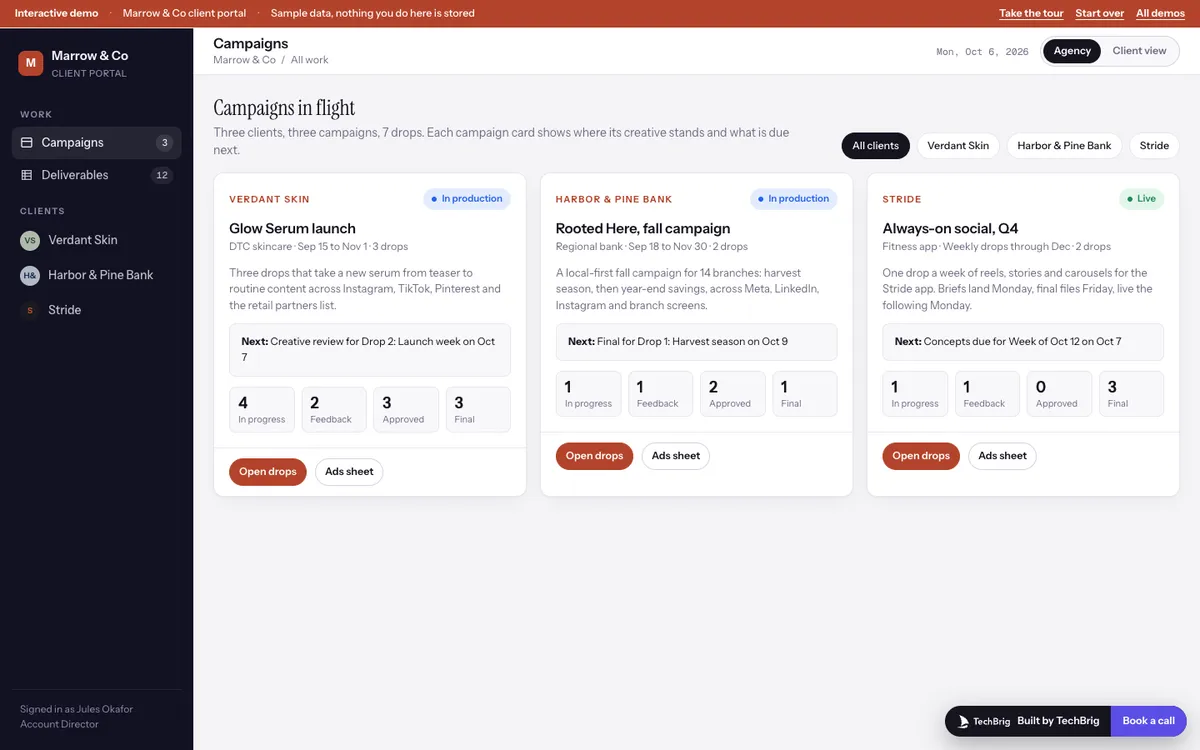
Marrow & Co, Monday October 6: three clients, seven drops, twenty-two pieces of creative. Drop 2 of the Glow Serum launch goes to review tomorrow.
Six things the demo does end to end
Campaigns and their drops
Each campaign is a sequence of dated drops with five milestones: brief locked, concepts due, creative review, final, live. The campaign card shows what is due next and how much creative sits in each state.
A concept board per drop
References on one tab, creative on the other, grouped by state: in progress, feedback received, approved, final. A visible dropdown on each card moves it, and adding creative is the main action on the screen.
Quick look with the thread
Preview, specs, versions and the comments between the client and the studio, in one panel. Approve, feedback received and mark final are three buttons, and the summary for the designer is pulled from the thread.
A spec check on upload
The add form asks for format, placement, intent, fidelity, a working link and the staged file. The file's dimensions are read against the placement before it lands, so a 1:1 story for Instagram Stories is caught at the door.
The ads sheet and present mode
Every approved and final piece with dimensions, duration and file type, plus columns the buyer adds. A review deck is built from the drop: cover, plan, one slide per creative, milestones.
The client view and the weekly update
Switch to see the portal as the client does: only shared work, their comments and the sheet. The weekly update is drafted from the board, the brief and the comments, each paragraph with its source, and sent only when the account director presses Send.
Three steps, five minutes
Take the tour
Fifteen stops, about five minutes. Campaigns, a drop, the board, a quick look, the ads sheet, present mode, the client view and the weekly update.
Open Drop 2 of the Glow Serum launch
Open carousel 03, read what Priya asked for, press Summarize the thread, then approve something and watch it reach the ads sheet.
Add a creative, then switch views
Press + Creative with the default file and see the spec check flag it. Then switch to the client view and see what is left.
We build it custom for your studio
The demo runs on sample data. A real build connects to your own tools and is fitted to how you already work.
Your clients, your drops, your file store
Connected to where the work already lives, whether Figma, Frame.io, Google Drive or Dropbox, with the campaign and drop structure your producers already use.
Your review rules
Which states exist, who can move an item, what the client can see and when, and what counts as final. The portal follows your process rather than teaching you one.
Drafts your account team edits
Weekly updates, change lists for designers and concept directions from the brief, each sentence traceable to the comment, brief or board it came from. A person sends.
Built in weeks, then yours
A first version on a real campaign in a few weeks, extended as your studio changes, and documented so it does not depend on us.
Want this built for your studio?
Thirty minutes with Ishaan: what it would connect to, what it needs from your side, and whether it makes sense to build it together.
Book a free callor write to us at [email protected]