One intake, every court form filled, for any jurisdiction
A self-represented person or a clerk answers the questions once. The rules for the jurisdiction decide which official forms the case needs, Claude reads the bank statements onto the lines of the financial statement, and every PDF is filled, previewed and editable field by field. The demo ships with California family law, US bankruptcy and Ontario family law.
Runs in your browser on three sample matters; your edits stay on your device. Claude's reading of the statements is replayed from a real run, and sample statements are inside the demo so you can try the upload yourself.
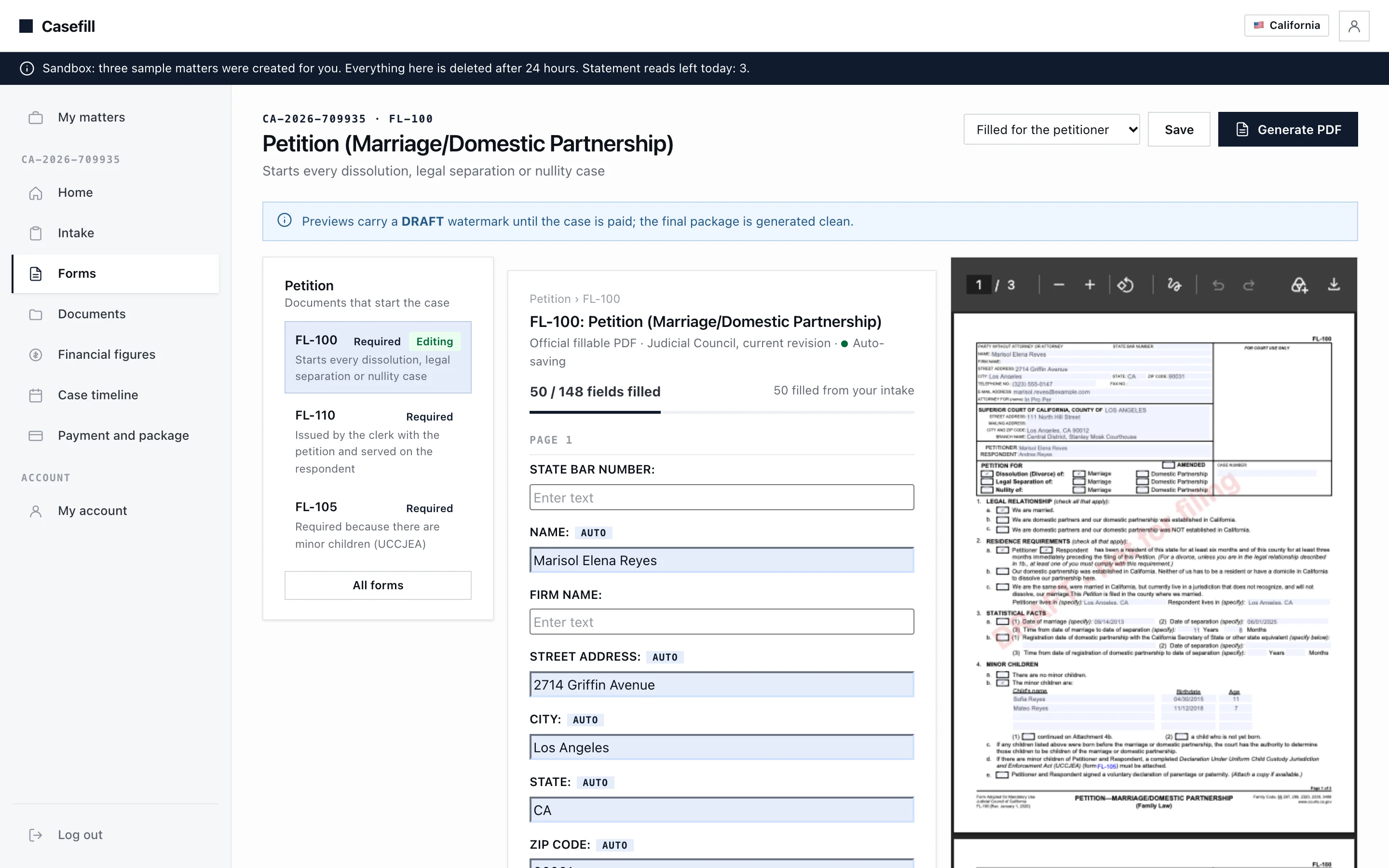
FL-100, the California petition, filled from the intake. Fifty fields auto-filled and the official PDF previewed beside the editor.
Six things the demo does end to end
Three jurisdictions, one intake
A California dissolution (FL-100, FL-110, FL-105, FL-120, FL-150, FL-142), an individual Chapter 7 or 13 case (Official Form 101 and the 106 schedules) and an Ontario family application (Forms 8, 13.1, 13A, 35.1 and the rest of the Family Law Rules set). Each jurisdiction is a data pack: forms, intake steps, rules and field maps.
The rules pick the forms
Claims and case type decide what is required. A property claim adds FL-142 or switches Form 13 to Form 13.1, minor children add the UCCJEA declaration, a vehicle loan lands on Schedule D. Court events recorded on the timeline unlock the next stage's forms.
Bank statements read line by line
Upload a statement and Claude lists every transaction and balance as an entry on the right line of FL-150, Schedules I and J, or Form 13.1. You accept, fix or reject each entry. Nothing reaches a form unreviewed.
Official PDFs, filled and editable
The actual Judicial Council, uscourts.gov and Ontario court PDFs, filled by field name and position, previewed live with a draft watermark, and editable field by field with auto-save.
Finished packages
Generate every required form, pay once (a demo checkout), and download the court-ready package as a zip without the watermark. Ontario documents that are not fillable PDFs are generated as Word files.
Built to add a jurisdiction
A new court is one folder: its PDFs, the intake questions as data, the claims and categories, a rule that decides the forms, and a map per form. The client renders it without code changes.
Three steps, five minutes
Take the guided tour
Two minutes. A spotlight walks through the three sample matters, a statement Claude has read, the review, the confirmed figures and the filled FL-150.
Open Reyes v. Reyes
Accept the statement entries, confirm the figures, then open FL-150 and watch the official PDF update as you edit a field. Generate it and download the draft.
Upload one yourself
In In re Daniel Okafor, download the sample Harbor Federal statement from the documents page and upload it. The demo replays Claude's reading in a few seconds; live, it takes about half a minute.
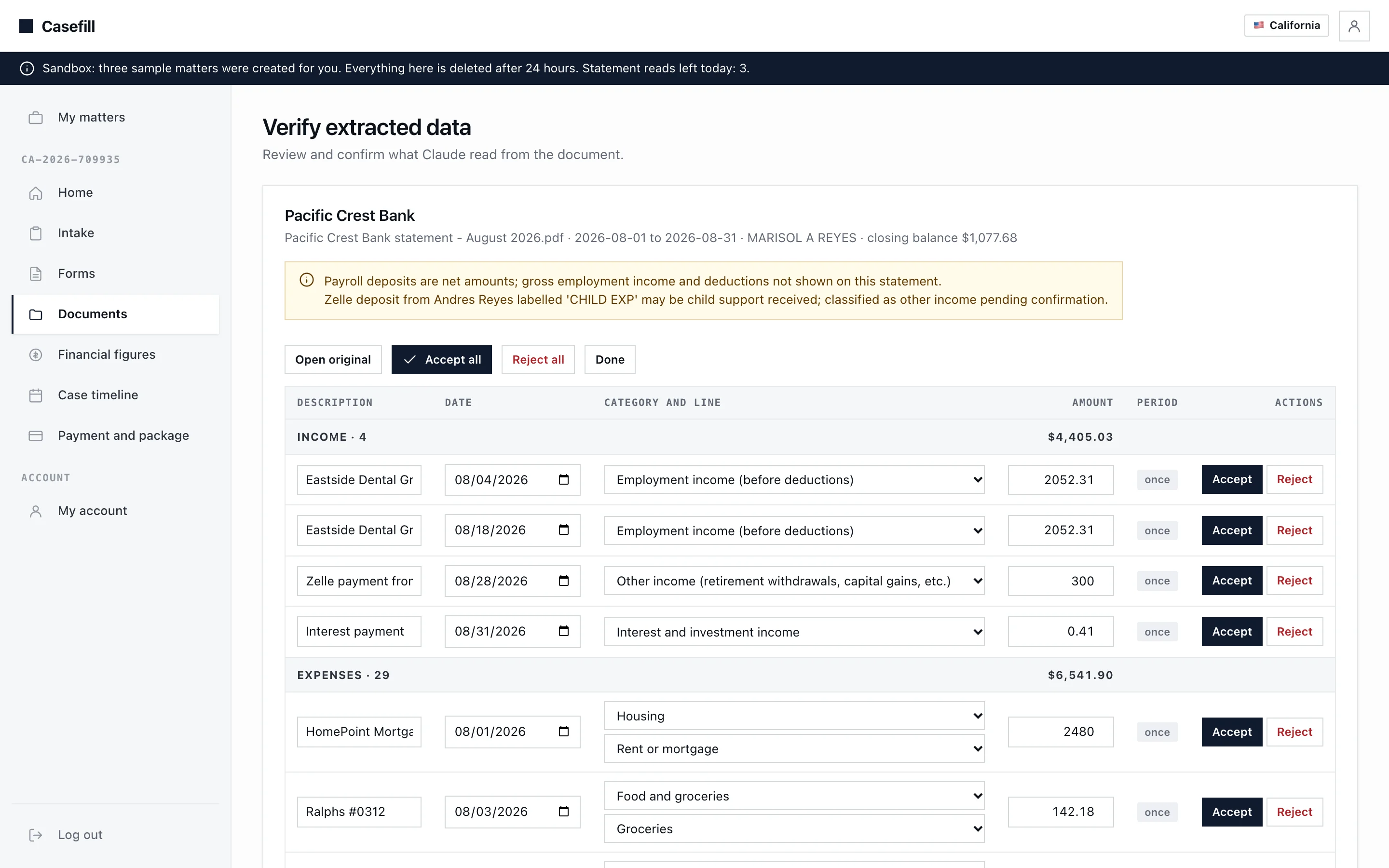
Every transaction from the statement, categorised onto a line of FL-150, waiting for a human to accept it.
We build your form filler, custom for your practice
The demo runs on sample matters. A real build fills the forms your practice files, in your jurisdiction, and is fitted to how your intake already works.
Your forms and your rules
The forms your practice files, in your jurisdiction, with the decision rules your clerks apply by hand today.
Your intake
Questions in your words, ordered the way your intake meeting runs, with the conditional branches your matters need.
Your documents
Statements, pay stubs, tax notices and disclosure documents read into the financial statement your court requires, reviewed by your staff before anything is filed.
Your practice management
Matters, contacts and documents synced with Clio or the system you already use, with e-signature, filing and payment steps added as needed.
Want this for your practice?
Thirty minutes with Ishaan to walk through the forms your practice files today and what a custom build would look like.
Book a free callor write to us at [email protected]