The close, four days in, with the exceptions already sorted
A working prototype of a month-end close cockpit for a bookkeeping practice. An agent pulls the bank feeds, asks clients for what is missing, matches each bank line to a bill or a rule and flags the differences it cannot settle. What reaches a person is the exception, the draft and the review.
Runs in your browser on sample data. Nothing you do in it is stored. Built for bookkeeping and accounting practices.
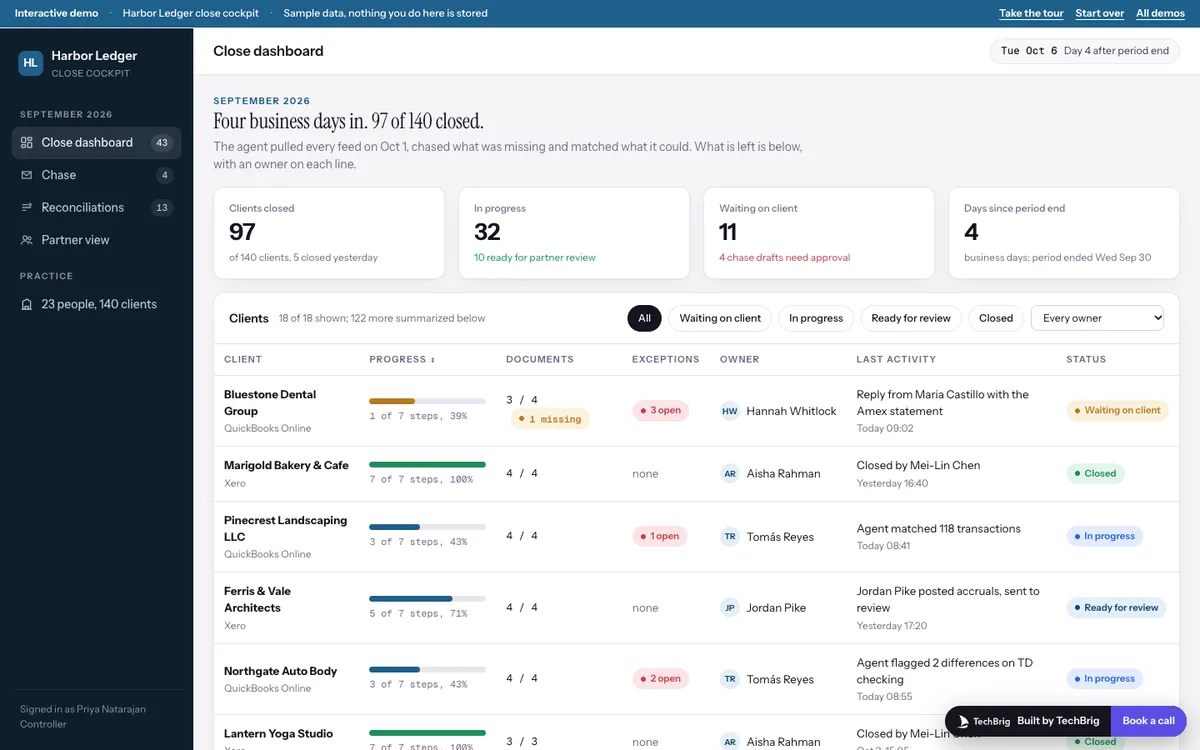
Harbor Ledger, September 2026, four business days after period end: 97 clients closed, 32 in progress, 11 waiting on a client.
Six things the demo does end to end
A dashboard that says where each client stands
Progress on the seven-step checklist, documents received against expected, open exceptions, the owner and the last thing that happened. Filter by status or owner and sort by progress.
A checklist with an owner on every step
Bank feeds, statements, matching and reconciliations belong to the agent; accruals, review and close belong to a named person. A blocked step says what it is waiting on.
Chase messages a person approves
The agent writes one message per client naming the exact missing items and where to find them, with the reason it asked for each. Approve and send, or edit the text first. Replies and attachments land in the sent log.
Matches you can interrogate
Each bank line shows what it matched to, a confidence meter and the rule or reason. Press Why and the agent explains the match, with a chip on every sentence that opens the passage it came from.
Differences with a suggested cause
A reconciliation difference shows the bank side and the ledger side, the likely cause and a suggested entry. Accept it to draft the entry for the owner's approval, or investigate with a note.
A partner view and a drafted note
Every client on one screen with ready-for-review rows highlighted and hours this close against last close. A note to each partner is drafted from the state of their own clients.
Three steps, five minutes
Take the tour
Fifteen stops. It walks from the dashboard into a blocked client, its missing documents, the chase and the reply, the matched transactions, one exception and its resolution, then the reconciliations and the partner view.
Settle an exception
Open Bluestone Dental or Northgate Auto Body, show the suggested cause on a difference and accept it. The checklist and the dashboard row move with it.
Approve a chase
Open Chase, read the drafts the agent wrote this morning, edit one and approve another. Then open Reconciliations and filter by cause.
We build it custom for your practice
The demo runs on sample data. A real build connects to your own tools and is fitted to how you already work.
Your ledgers and your document channels
Connected to QuickBooks Online and Xero through their APIs, to the bank feeds already in them, and to the way clients send documents today: a portal, email or a shared drive.
Your checklist and your matching rules
The close steps your practice follows, in your order, with the vendor rules and tolerances your team already applies, so the agent matches the way your best bookkeeper does.
Run on last month first
Pointed at a closed period and compared line by line with what the team did, then tuned until the exceptions it raises are the ones your reviewers would have raised.
A person on every entry and every message
The agent drafts entries and messages. The client's owner approves each entry before it posts and each message before it sends, and every sentence the agent writes carries its source.
Want this built for your practice?
Thirty minutes with Ishaan: what it would connect to, what it needs from your side, and whether it makes sense to build it together.
Book a free callor write to us at [email protected]