Invoices read and matched on arrival, approved by a person
A working prototype of an accounts payable inbox for a mid-sized manufacturer. Invoices land by email or upload, get read, matched to the purchase order and the receipt, coded and routed. What reaches the AP lead is the exception, with the reason and a suggested action attached.
Runs in your browser on sample data. Nothing you do in it is stored. Built for finance teams and controllers.
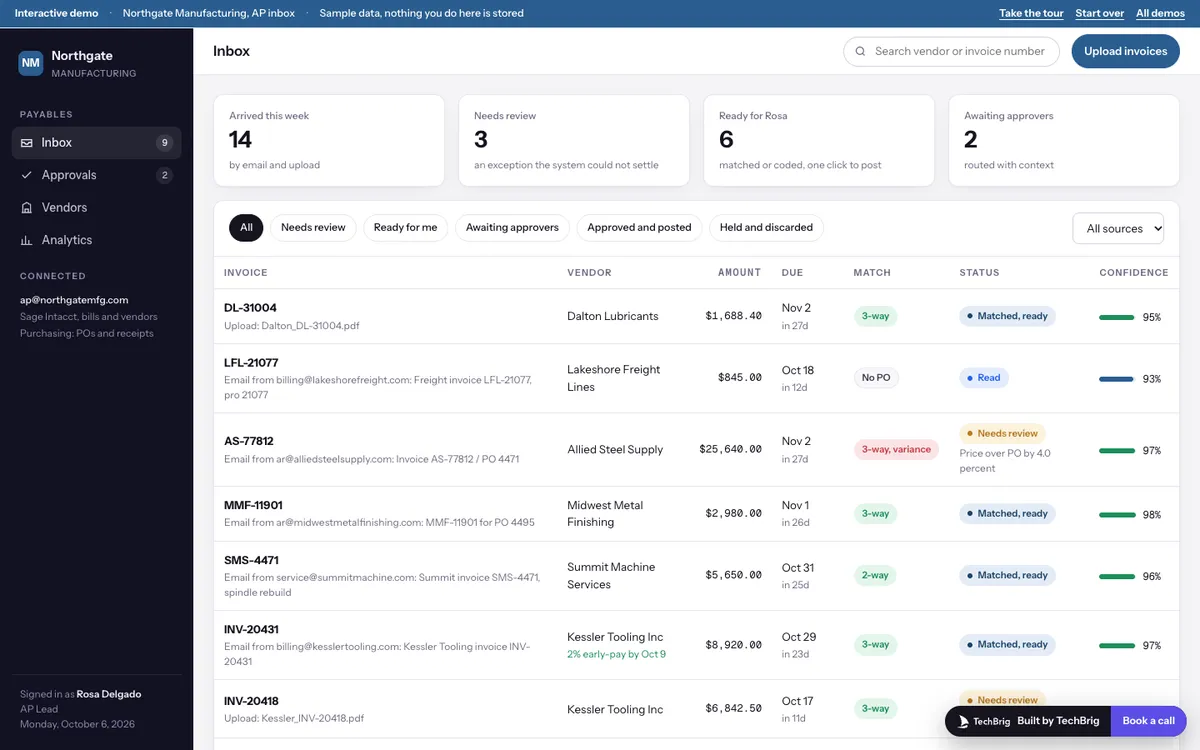
Northgate Manufacturing, October 6, 2026: twenty-six invoices from fourteen vendors, three of them waiting on Rosa Delgado, the AP lead.
Six things the demo does end to end
Read on arrival
Vendor, invoice number, dates, PO, line items and total are read from the PDF as it lands, with a confidence figure. Click any field and the place it came from lights up on the rendered page.
The three-way match
Purchase order, invoice and receipt side by side, line by line. Price and quantity differences are shown against a 2 percent tolerance band, so a 4 percent surcharge stands out and a 0.8 percent short delivery does not.
Exceptions with a reason and a next step
A price over the PO, a suspected duplicate, a missing receipt. Each one is explained in plain sentences, every sentence carries a source chip, and the suggested action is one click away.
Coding suggested, not imposed
The GL account and cost center come with the reason: the vendor's history, the PO, or the policy. Change it from the list if it is wrong.
Approvals with context
Invoices routed to a department head or the Controller arrive with why they need them, the match and the history. One click approves or holds, and the audit trail records every step.
Vendors and the month
Terms, spend, W-9 status and early-pay discounts per vendor, with duplicate records flagged for a merge. Analytics covers spend, cycle time, exceptions and discounts, with a short drafted monthly note.
Three steps, five minutes
Take the tour
Fourteen stops. It uploads three invoices, opens one with a price variance, approves it, then visits the approvals queue, a suspected duplicate, the vendor merge and analytics.
Work the inbox
Filter to Needs review and open each exception. Approve, hold or route to a person; the inbox, the approvals queue and the audit trail all update.
Start over and try the other paths
Reset from the banner, then discard the duplicate, hold the missing receipt, merge the vendor records and draft the monthly note.
We build it custom for your finance team
The demo runs on sample data. A real build connects to your own tools and is fitted to how you already work.
Your accounting system and your inbox
Connected to the system you post bills in, whether Sage Intacct, NetSuite, QuickBooks or Dynamics, and to the mailbox and portal where invoices already arrive.
Your POs, receipts and tolerances
Matching against your purchasing data with your tolerance bands, your approval limits and your routing rules, so the exceptions that reach a person are the ones your policy says should.
Tested on last quarter
Run on a sample of invoices you already processed, compared with what the team did, and tuned until it agrees before it touches a live invoice.
A person approves every bill
The system reads, matches, codes and explains. A person approves, holds or routes. Nothing posts or pays on its own, and every step is on the audit trail.
Want this built for your finance team?
Thirty minutes with Ishaan: what it would connect to, what it needs from your side, and whether it makes sense to build it together.
Book a free callor write to us at [email protected]